User Roles
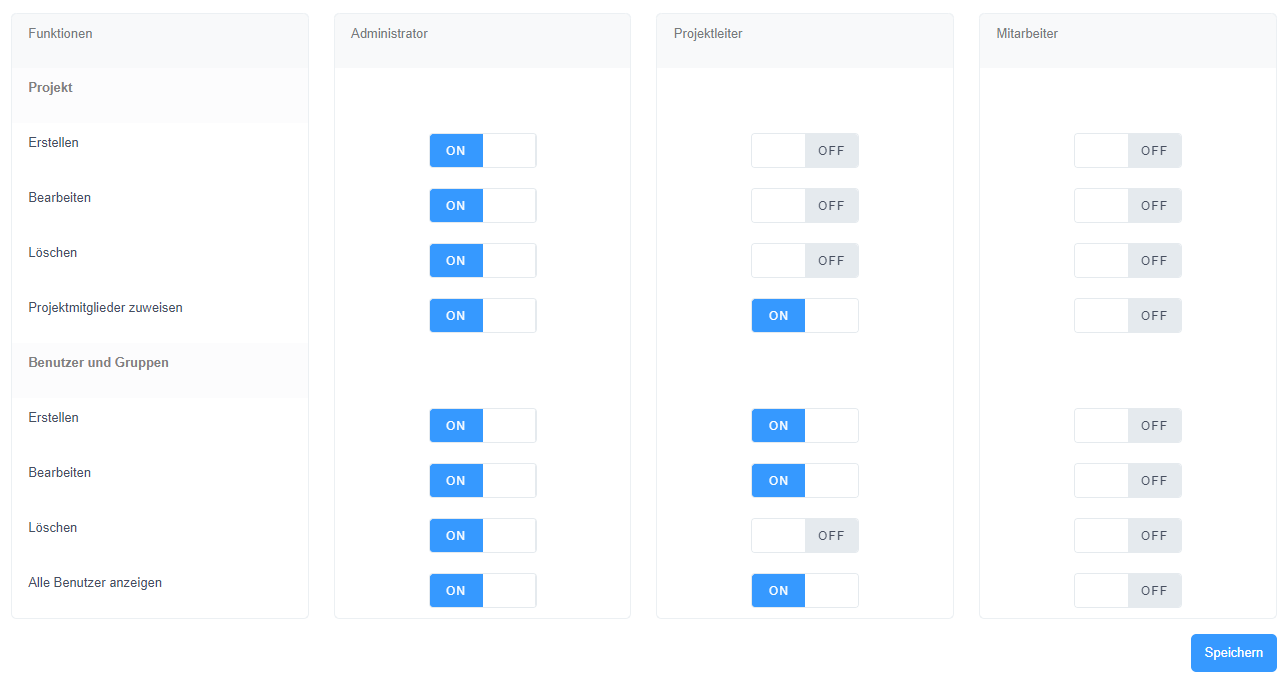
The image shown illustrates the settings menu for the user roles in the project room, which allows a flexible and individual definition of access rights. Administrators of the project room are authorized to configure the access rights for the three customizable user roles - administrator, project manager and employee - as required. The fourth role, guest user, is predefined and limited to access to assigned projects.
Within this menu, administrators can precisely define the permissions for each role. Functions such as creating, editing and deleting projects, assigning project members, and managing user accounts and groups are configurable options. Each role can thus be customized to meet the organization's specific requirements and security protocols.
For example, a project manager can be given the ability to create and edit projects, but not delete them. Employees could in turn be given the right to view information about projects without being allowed to change them. Through such settings, the system supports a differentiated and role-based way of working, which increases both organizational flexibility and security.
This customizable role definition is an essential feature for managing the project space and helps to ensure that workflows are efficient and secure. Administrators are advised to configure the roles carefully to best support the organizational structure and project requirements.