Projects
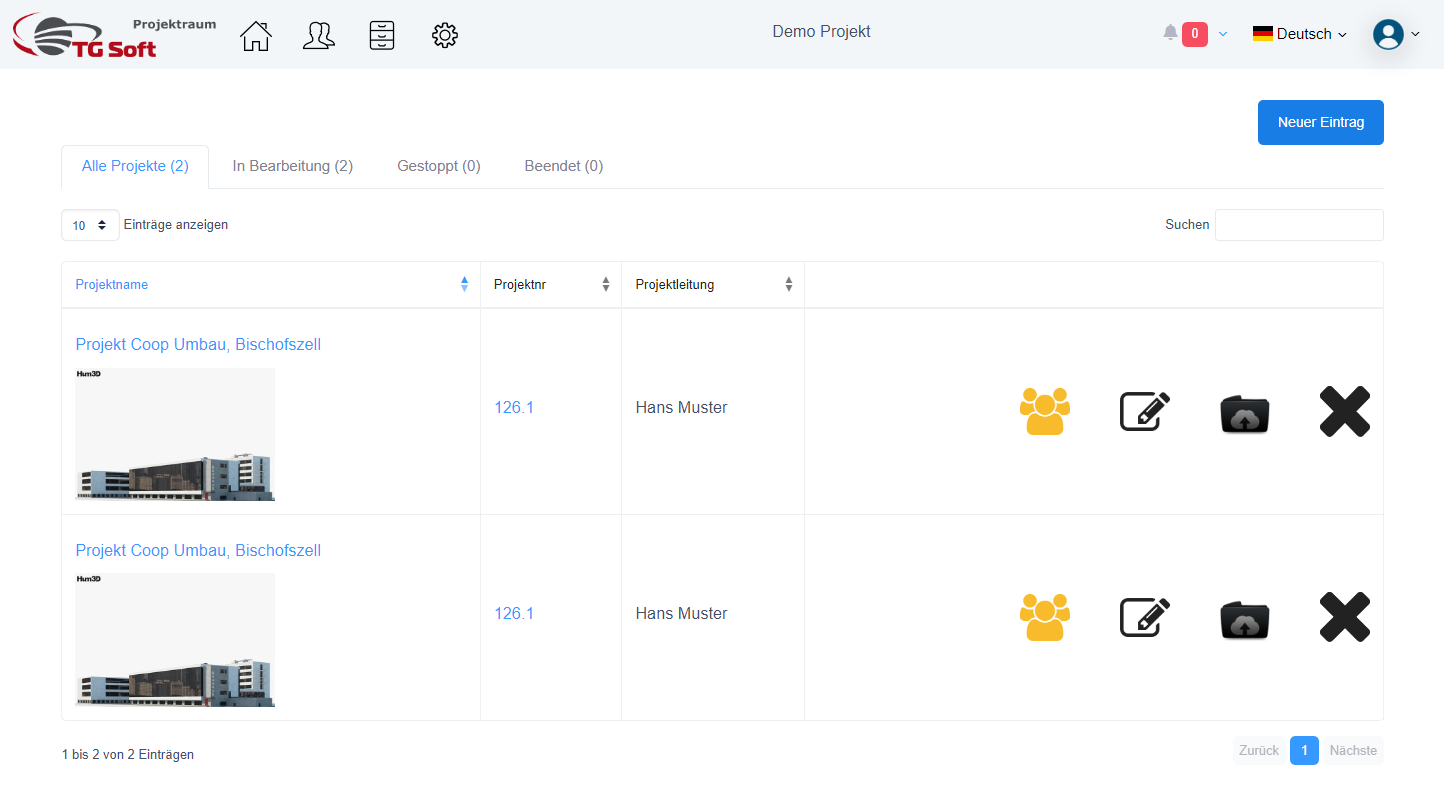
The project management interface provides you with an efficient way to view and manage the status of your projects. At the top of the page you will find the tabs "All Projects", "In Progress", "Stopped" and "Completed", which represent the different project states.
Next to the tabs is the "New Entry" button. By clicking on this button you can create new projects.
Below the tabs, you will see a list of the projects you have access to. The visibility of the projects depends on your access role: for example, an employee only sees the projects in which he or she is defined as a project participant, while an administrator can see all projects, regardless of his or her participation.

In this view, you have the option to adjust the number of visible entries via a drop-down menu. On the right side, there is a search field that allows you to search the projects quickly and easily.
Each project in the list is flanked by icons for different actions:

- The "man" icon allows you to manage project participants.
- You can use the pencil icon to edit the project details.
- The folder icon takes you to the project file platform where all plans and documents are stored.
- You can use the "X" symbol to delete a project.
Project - Create
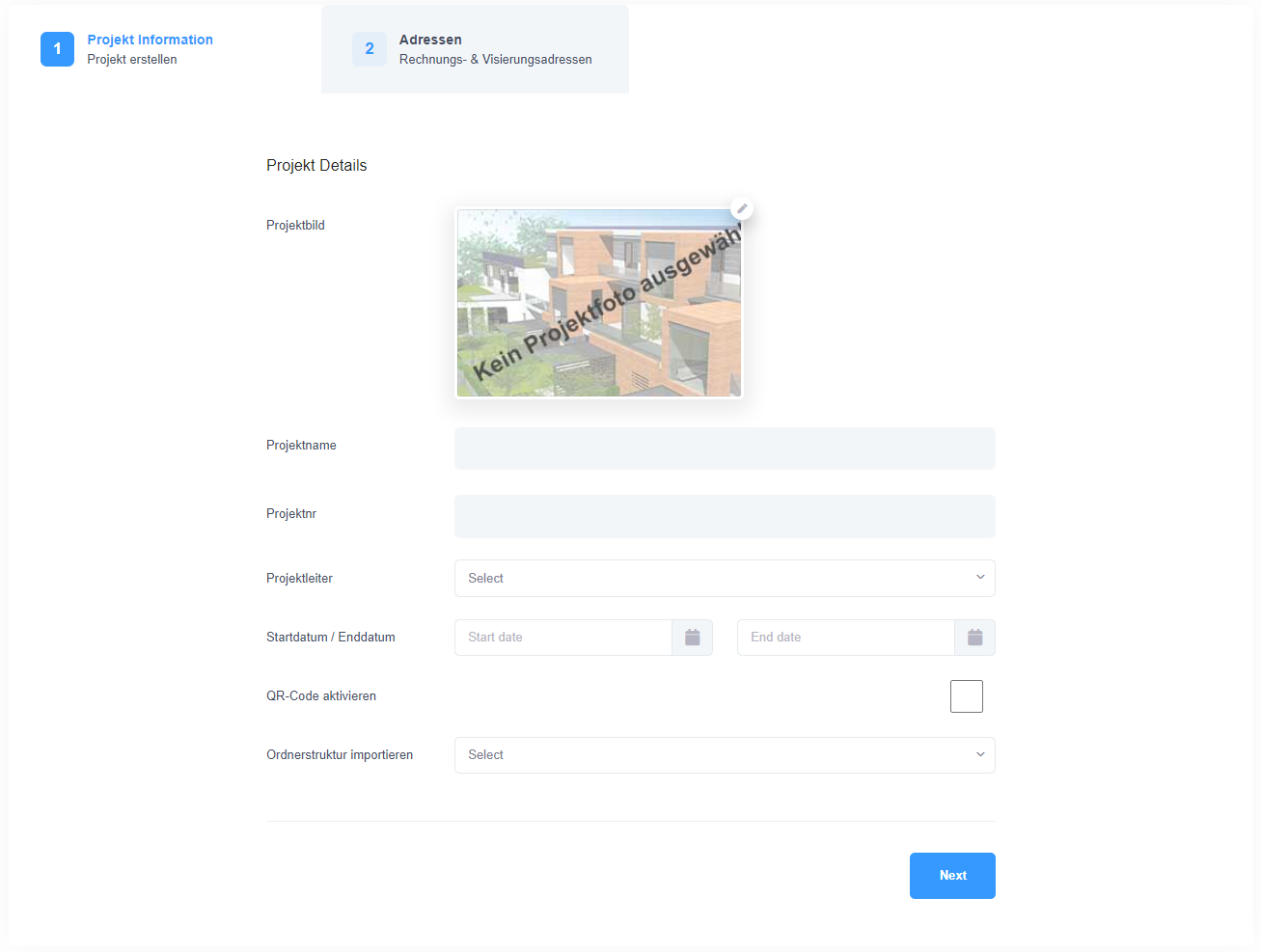
The image above is the form for creating a new project, which requires the input of basic project details. Users can add a visual project image here to visually identify the project. Further inputs include the project name, project number, and the selection of a project manager. The start and end dates of the project are set for scheduling and overview.
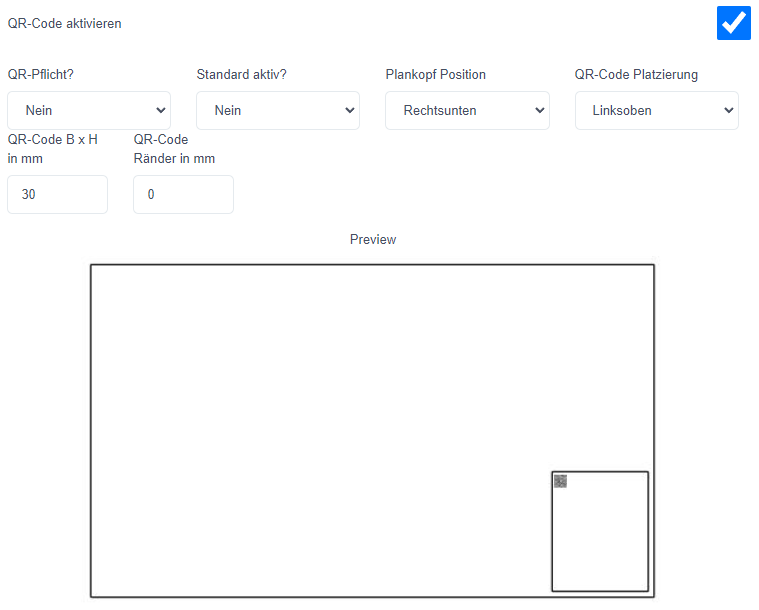
A special feature of this form is the ability to enable a QR code. Enabling this option allows configuring a standard for positioning the QR code on plans, as well as setting its size and placement. The feature also offers the option to make the QR code mandatory for each order, which facilitates tracking and management of project documents.
In addition, the form allows you to import a folder structure from an existing project. This function is particularly useful for saving time and maintaining consistency in file management. Only the folder hierarchy is adopted, while user and group assignments from the original project are not copied.
In the second step of the process, users have the option of defining billing addresses for orders. These addresses are later displayed in the order mask and are used to correctly assign cost centers or for billing purposes.
The design of this form reflects the desire to enable intuitive and efficient project creation and management, with the implementation of QR codes representing a modern and progressive approach to document management within the project space.
Project - Edit
Editing an existing project follows a similar pattern to project creation. Users access a form similar to the original creation form to make changes to the project details. All previously entered information can be revised and updated to bring the project up to date.
During the editing process, users can customize the project name, which serves as the core identifier. Although the project name is the primary identifier, additional details such as the project number and the selection of a project manager can be changed to more accurately reflect the project data or to account for personnel changes.
The uploaded project image can be updated to provide a new visualization of the project, which can be especially helpful when the project scope or status changes. The start and end dates are also flexible, allowing for dynamic planning and adaptation to changing project schedules.
QR code settings can also be modified to accommodate changing document management and control requirements. Users have the option to re-evaluate the need for the QR code and adjust the placement or size dimensions if necessary.
Finally, the billing and shipping addresses can be reviewed and modified if necessary to ensure that order processing and billing are carried out correctly.
The editing form provides a consistent and user-friendly interface that enables efficient management and maintenance of project information. This flexibility in project editing is crucial for managing projects effectively and responding to changes in the project's progress.