Plot order
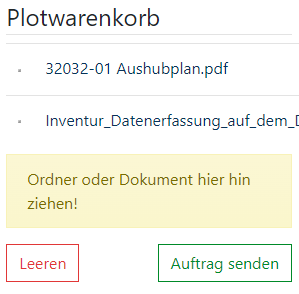
Orders for plots can only be created via the file platform. Prepare your plot shopping cart by selecting individual files or entire folders and then clicking on "Send order". The selected documents are displayed in the order form with their file name and the width x height dimensions.
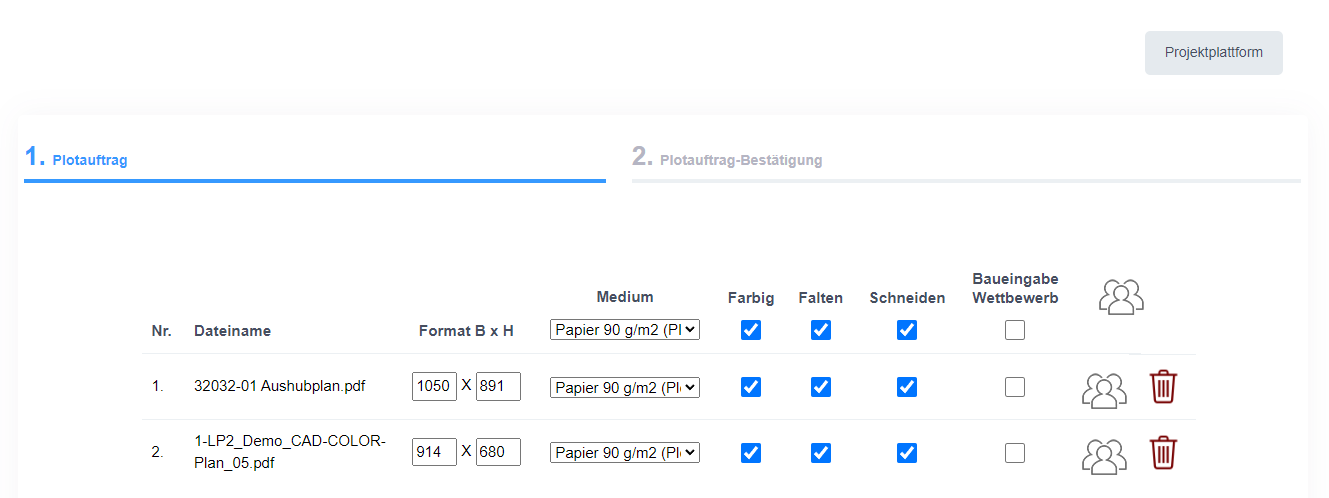
In the upper part of the job mask you can make general settings for the entire job. It is also possible to define individual settings for individual documents.
 | No recipients selected |
 | Global recipients selected |
 | Individual recipients selected |
 | Remove document from the order list |
Order properties
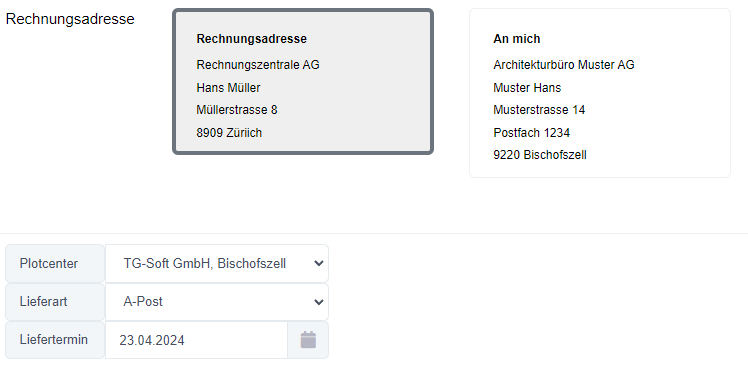
Billing address : The billing address is defined in the middle section of the order form. If no billing address is stored for a project, the option "As agreed" is selected by default. If a billing address is available, it is automatically entered as a preselection.
Plot Center: The Plot Center allows the user to select the person who will carry out the order. If the Plot Center offers multiple locations, the order can be carried out at the appropriate location depending on the selection. This is particularly relevant if you want to collect the plans personally at the location.
Delivery type and delivery date: The options for the delivery type and delivery date are self-explanatory and are specified directly in the order form.
QR Code: The QR Code can be inserted into the It can be activated or deactivated Project setting . It is also possible to define it as a required field with a default setting.
Plot confirmation email: The client has the option of activating a plot confirmation email as a PDF. This is sent automatically as soon as the order has been successfully sent to the plot center.
Comments field: In the comments field, additional information can be sent to the plot center to communicate specific requirements or details about the job.